PagerDuty
Page your on-call for AI agent incidents in PagerDuty. One PagerDuty incident per correlated AxioRank incident, with trigger, acknowledge, and resolve kept in sync both ways.
The PagerDuty integration turns AxioRank's correlated incidents into PagerDuty incidents and keeps the two in step. A real attack produces many alerts; AxioRank groups them into one incident, and this integration opens exactly one PagerDuty incident for it, with a deep link back and the recommended response actions in the details. Acknowledge or resolve on either side and the other follows.
PagerDuty + AxioRank Integration Benefits
- Page your on-call the moment AI agent activity opens a high-risk incident, with no extra glue code.
- Open one PagerDuty incident per correlated AxioRank incident, deduplicated on the incident id, so a noisy attack does not flood your pager.
- Send a deep link back to the incident in AxioRank, plus the AI triage recommended actions, in the incident details.
- Acknowledge or resolve in either product and the other follows, with bidirectional synchronization.
- Resolve PagerDuty incidents automatically when AxioRank auto-resolves a stale incident.
- Encrypt the routing key at rest, bound to your workspace.
- Available on every plan (Free, Pro, and Team), with no tier gate.
How it Works
When an AxioRank incident opens, AxioRank sends a trigger event to PagerDuty's Events API v2 and opens a single PagerDuty incident, keyed on the AxioRank incident id. As the incident is acknowledged, resolved, or auto-resolved in AxioRank, AxioRank sends the matching acknowledge or resolve event so the two stay aligned. With two-way sync enabled, a responder's acknowledge or resolve in PagerDuty reflects back onto the AxioRank incident through a signed webhook.
Each PagerDuty incident carries a summary with the incident title, the severity mapped from AxioRank, custom details with the correlated alert count, blast radius, and the AI triage recommended actions, and a link straight to the incident in AxioRank. Severities map to PagerDuty as critical to critical, high to error, medium to warning, and low to info, so your urgency rules and escalation policies apply as written.
Available on every plan
Triggering, the incident lifecycle, and two-way sync are all available on Free, Pro, and Team. There is no tier gate.
Requirements
- A PagerDuty account, with a user who can add an integration to a service (a Manager base role or higher).
- A PagerDuty service to page, or permission to create one.
- An AxioRank workspace (any plan).
Permissions and data access
This integration uses a single PagerDuty Events API v2 integration key, which is a write-only credential scoped to one service. It can only send events (trigger, acknowledge, and resolve incidents). It cannot read your PagerDuty data, and it is not an account-wide REST API token. Two-way sync does not add any read access either: PagerDuty pushes incident updates to AxioRank through a webhook that AxioRank verifies with a signing secret, so AxioRank never calls back into your PagerDuty account. The integration runs on the least privilege PagerDuty offers for sending events.
Routing key encrypted at rest
When a credential key is configured on the deployment, AxioRank encrypts the routing key with AES-256-GCM, bound to your workspace so a ciphertext cannot be reused elsewhere. Channels created before this keep working unchanged.
Support
If you need help with this integration, email agents@axiorank.com or visit https://axiorank.com/support. You do not need an account to reach support. Including your workspace name and what you are seeing helps us respond faster.
Integration Walkthrough
In PagerDuty
The fastest path connects from the AxioRank side in one click and creates the PagerDuty integration for you (see In AxioRank below). To set the key up by hand instead, create an Events API v2 integration on your service first.
Integrating with a PagerDuty service
- In PagerDuty, open the Configuration menu and select Service Directory.
- Click the name of the service you want to page, then open its Integrations tab. To page a new service instead, create the service first, then return here.
- Click Add another integration.
- Under Integration Type, choose Events API v2, then click Add.
- Expand the new integration and copy its Integration Key (the routing key). Keep it somewhere safe; you will paste it into AxioRank in the next section.
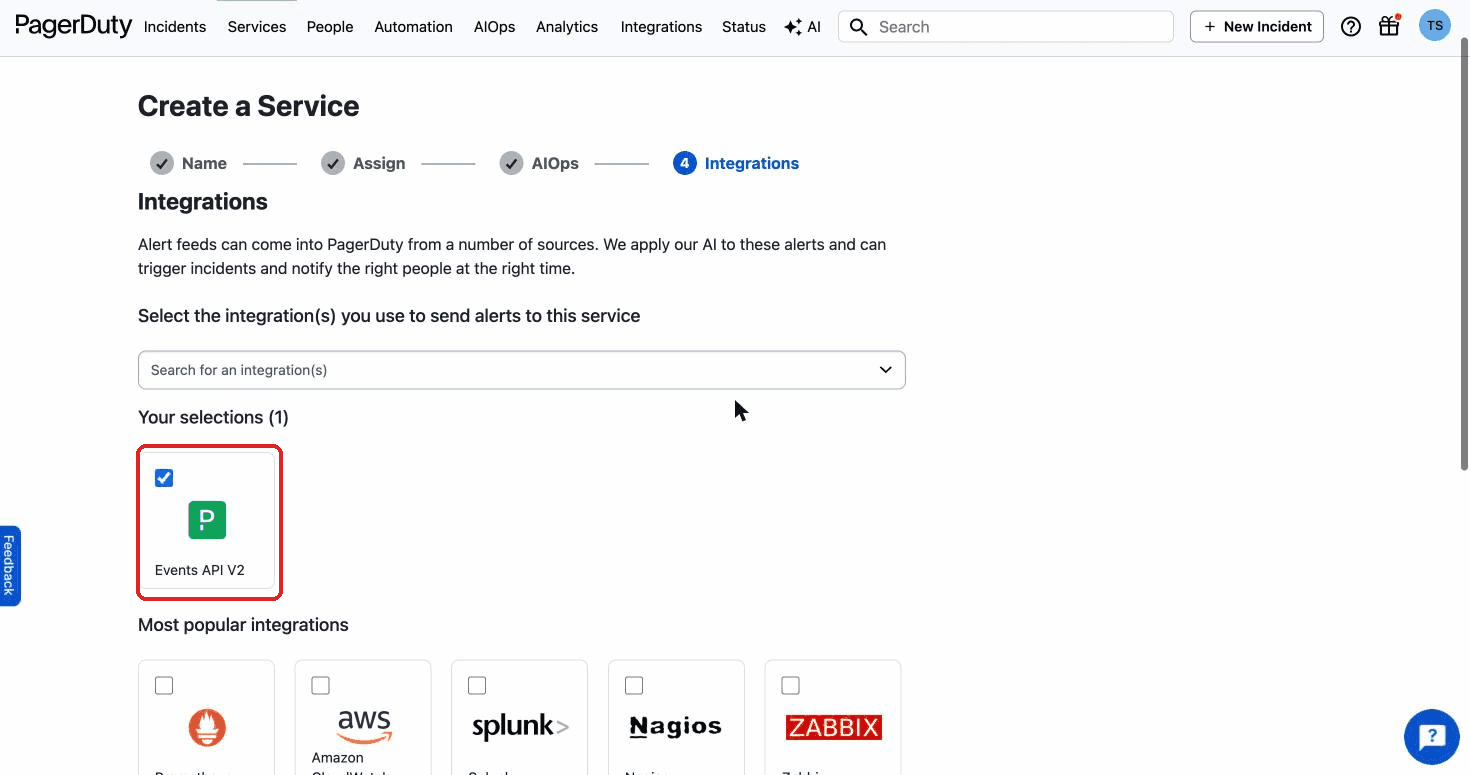
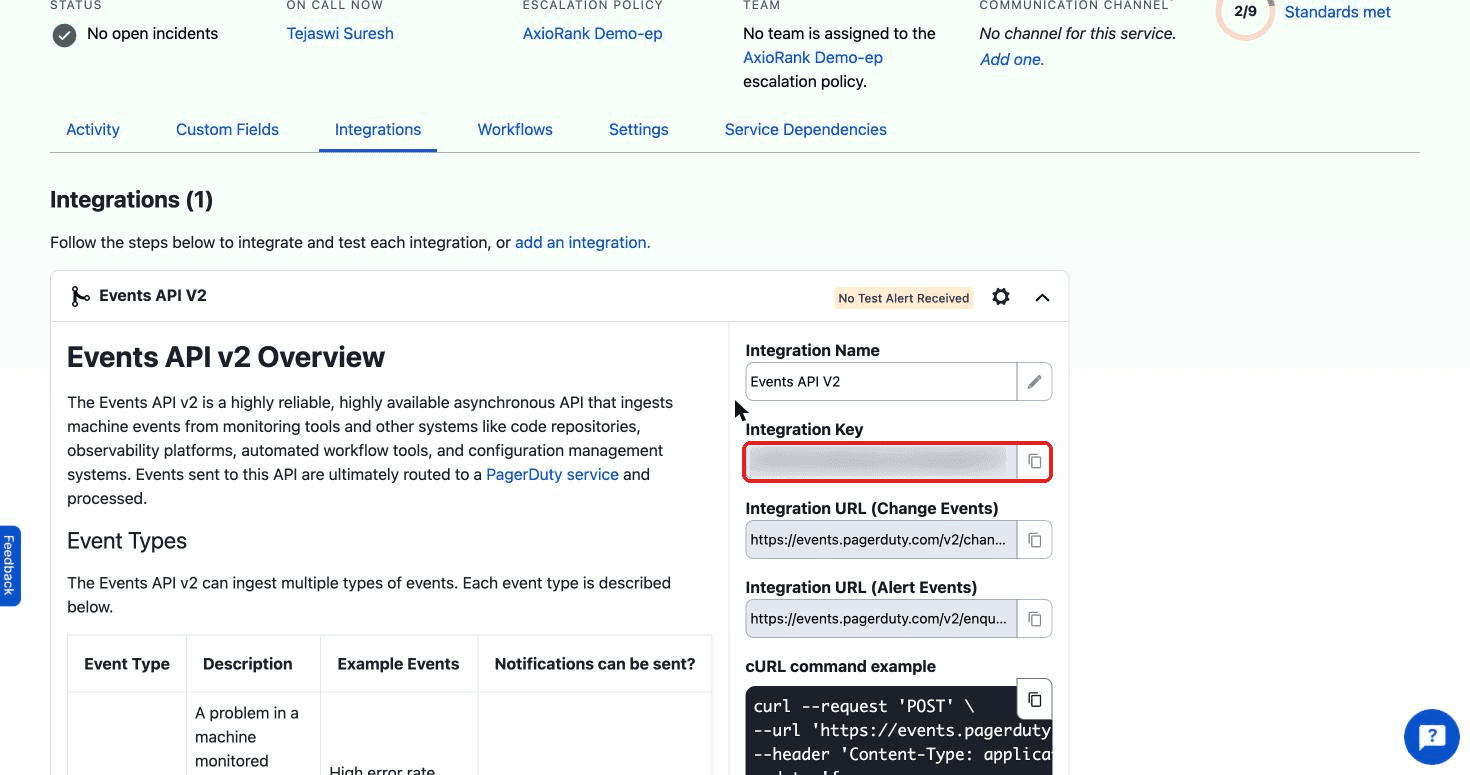
To enable two-way sync, also add a webhook so PagerDuty can tell AxioRank when a responder acts:
- Create the channel in AxioRank first (next section) and copy the webhook URL it shows you.
- In PagerDuty, add a V3 webhook subscription scoped to the service, point it at that URL, and subscribe it to incident.acknowledged and incident.resolved.
- Copy the signing secret PagerDuty generates, then paste it back into AxioRank.
In AxioRank
The fastest path is one click. Open Channels, click Add Channel, pick PagerDuty, and choose Connect PagerDuty. You are sent to PagerDuty's install flow, you pick the service to page, and AxioRank creates the channel with the routing key already filled in. No copy and paste.
To set it up by hand, or when self-hosting without the app configured:
- Open Channels and click Add Channel.
- Pick PagerDuty, then paste the Integration Key into the PagerDuty routing key field.
- Set a Name, choose what pages (see below), and click Create channel.
- Click Send test. It triggers a throwaway incident and immediately resolves it, so you confirm the routing key without leaving an open incident behind.
- For two-way sync, paste PagerDuty's signing secret into the channel. AxioRank verifies every inbound payload against that secret before acting, and the reflected update never pages back out, so there is no loop.
Choose what pages
A PagerDuty channel offers two modes:
- Correlated incidents (recommended). One PagerDuty incident per AxioRank incident, deduplicated on the incident id. AxioRank triggers when the incident opens, acknowledges when it is acknowledged, and resolves when it resolves.
- Every high-risk alert. One trigger per high-risk call. This mode respects the channel's severity floor, quiet hours, and hourly cap.
How to Uninstall
- In AxioRank, open Channels, find the PagerDuty channel, open its row menu, and choose Delete. To keep the configuration but stop paging, disable the channel instead.
- In PagerDuty, open the service's Integrations tab and delete the Events API v2 integration you created for AxioRank.
- If you enabled two-way sync, also delete the V3 webhook subscription you added for that service.
Deleting the integration key in PagerDuty immediately stops AxioRank from paging that service, even if the channel still exists in AxioRank.
FAQ
Does this work on the free plan? Yes. Triggering, the lifecycle, and two-way sync are available on every plan with no tier gate.
Is the routing key stored securely? Yes. When a credential key is configured on the deployment, the routing key is encrypted with AES-256-GCM and bound to your workspace. It is stored as channel configuration and is not shown again after you save it.
Does the integration need a read/write API key? No. It uses a write-only Events API v2 integration key that can only send trigger, acknowledge, and resolve events. It never reads from PagerDuty.
How do I test it without leaving an open incident? Use Send test on the channel. It triggers a throwaway incident and resolves it immediately.
Will an acknowledge in PagerDuty page my team again? No. Reflected updates from PagerDuty are applied to the AxioRank incident and never trigger an outbound page, so there is no loop.
A test ping I sent before saving the signing secret was rejected. Is that a problem? No. AxioRank cannot verify an inbound payload until the signing secret is saved, so a ping sent before that is expected to be rejected.
Microsoft Teams
Bring AxioRank into Microsoft Teams. Route high-risk AI-agent alerts to a chat or channel and approve or deny held tool calls right in Teams, with Bot Framework verified callbacks and a tamper-evident audit trail.
WordPress
Verify the AI agents that reach your WordPress REST API, admin, and dynamic endpoints with the AxioRank Agent Verification plugin. A thin client of the inbound verify endpoint, with monitor and enforce modes.